


FMU - Football Manager Game
4.1181.00 Reviews
App Specs
- Version
- 2.1.67
- Updated On
- License
- Free
- Downloads
- 5,000,000+
- Developer
- Trophy Games - Football Manager makers
- Categories
- Sports
- Platform
- Android
Screenshots



 Analysis by AppCompare
I tend to enjoy football games more when they let me think through a season rather than ask me to control every pass, so a management sim is a natural fit. FMU - Football Manager Game puts team decisions at the centre: choosing a club, shaping a squad and seeing how those choices fare in simulated matches. It is a free sports game from Trophy Games - Football Manager makers, and its appeal is less about quick action than the small managerial choices that build into a longer campaign.
Getting Started
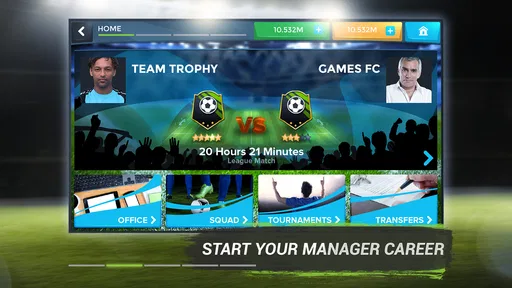
So, jumping right into it, when you first launch FMU - Football Manager Game, you're greeted with a pretty intuitive interface. The setup process is smooth, and within minutes, you're ready to start building your team. The game is available on both Android and iOS, so whether you’re an Apple aficionado or an Android enthusiast, you’re covered.
The game kicks off by letting you choose your preferred club, and from there, it's all about making the right moves. Whether it’s signing star players, crafting training schedules, or tweaking tactics, every decision counts. It's like having your very own virtual Premier League at your fingertips!
Game Mechanics and Features
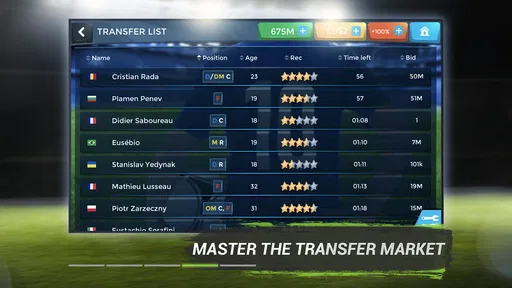
What really caught my attention in FMU is the depth of the management simulation. You’ve got everything from scouting new talent to developing youth players. The transfer market is dynamic and keeps you on your toes as you try to snatch that next wonder kid before your rivals do.
Training your squad is another crucial aspect. You can tailor individual training regimes or go for team drills. The choice is yours! It’s gratifying to see your player stats improve over time, reflecting your managerial acumen.
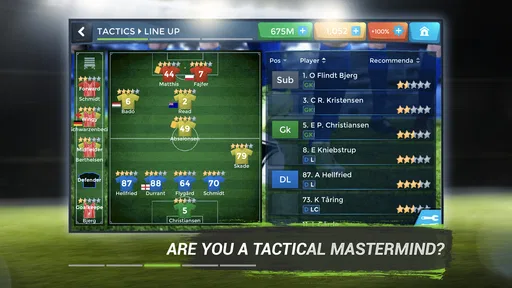
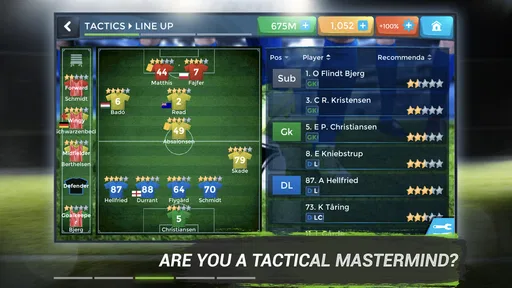
The matches themselves are simulated in real-time, and you can make tactical adjustments on the fly. Whether you favor a classic 4-4-2 or a more aggressive 3-5-2, the game allows for flexibility. Watching your strategies play out can be incredibly satisfying.
How to Make Decisions That Pay Off
The most useful way I found to approach the management side is to avoid changing everything after one disappointing result. A formation can look convincing on paper and still need time to show whether it suits the players you have. I’d make one deliberate adjustment, then watch the next match closely enough to judge whether the change helped. That makes the tactical layer feel like a test of reasoning rather than a string of random switches.
Worth Reading Before You Choose

Flipboard Shows What News Apps Must Do Beyond the Feed

Switching to Android Auto Means Rethinking Your Driving Routine

Google Calendar Makes a Crowded Week Easier to Manage

Ludo King Makes the Most of the Minutes Between Plans

Baby Panda World Brings Quick Play to Modern Phones, but Its Game Library Feels Busy

ESPN’s Live Game View Makes Following Close Games Easier
Squad-building also rewards patience. A tempting transfer is not automatically the right one if it leaves less room to improve another part of the team. I’d check the current squad’s weak spots before pursuing a high-profile signing, and keep youth development in view as a longer-term alternative. The trade-off is clear: a quick boost may feel satisfying now, while training a prospect asks you to wait for progress.
Training choices are easier to manage when they have a purpose. Instead of adjusting every regime at once, I’d focus on a player or area I want to improve, then give the change time to register in the squad’s development. That is a practical way to keep the management workload understandable, especially for someone new to football sims. It also helps separate a genuine improvement from the excitement of simply pressing more buttons.
User Experience
The user interface of FMU is sleek and user-friendly. The menus are well-organized, making navigation a breeze, even for newbie managers. The graphics are decent for a management game, with a nice balance between realism and playability.
One thing I appreciated was the community aspect. You can compete against friends or other players around the world in various leagues. It adds a competitive edge that keeps you coming back for more.
When a Short Session Works Best
This is a good game to open when I have a few spare minutes to review the squad, consider a transfer or think through a tactical tweak. It is less suited to someone looking for a quick arcade match with direct control over the players. The pleasure comes from making a decision and following its consequences, so I would not expect every brief visit to deliver a dramatic payoff.
A realistic routine might be checking the team during a commute or while waiting for an appointment, then returning later to see how a match played out. I’d use those short visits to handle one clear task—such as reviewing training or considering a roster change—rather than trying to overhaul the whole club in a hurry. That keeps the game’s many decisions from turning a casual session into a chore.
Compared with a conventional football game built around real-time controls, FMU is for people who would rather select tactics and manage player development than perform each move themselves. Compared with a simpler fantasy football setup, its emphasis on club management gives you more to think about than picking a lineup and checking results. That depth is a strength if you enjoy planning, but it can be a mismatch if you want immediate action or a very lightweight score-checking experience.
Speed, Stability, and Device Fit
I would set expectations around the pace of a management game, not a high-speed action title. The experience is built around menus, squad decisions and simulated matches, so its appeal is the rhythm of planning and reviewing outcomes rather than constant movement. If you are choosing it for rapid, hands-on football, a controller-style sports game is the better match.
Heavier use is likely to come from spending longer in the management loop: moving between team decisions, training and match tactics. I’d make those choices in a calm order instead of tapping through screens without checking what changed. That is not just a way to stay organized; it also makes it easier to notice whether a tactical decision or a training focus is producing the effect I wanted.
FMU has a long-running presence, with a release date of December 5, 2014, and the current version is 2.1.67. Those details offer context, but they do not tell me how it will behave on every phone or in every session. The practical approach is to install it on a compatible device and see how it feels in your own routine. On Android, the minimum operating system is version 9.
For resource demands, I would avoid promising that it will run identically on every device. The original appeal is that it does not demand the latest smartphone, but performance can still depend on the phone and what else is running. If a session feels sluggish, closing other active apps and reopening the game is a sensible first step; I would not treat that as a guaranteed fix. If reliability matters for a particular moment, make important squad decisions when you have time to check that they have taken effect rather than rushing through them.
Monetization and Accessibility
Now, let's talk about the not-so-glamorous part—monetization. FMU offers in-app purchases which, honestly, is pretty standard these days. You can progress without spending a dime, but if you’re impatient like me, you might find yourself tempted to splash some cash for quick upgrades.
The available in-app purchases range from $0.99 to $124.99 per item, so I’d recommend deciding on a spending limit before making any purchase. The game is free to download, but “free” does not mean every optional shortcut will feel inexpensive. I would first play at my own pace and decide whether waiting is genuinely spoiling the experience before paying to speed anything up.
The game is rated Everyone, and the available audience is broad, though a younger player may still benefit from an adult’s help understanding optional purchases. It is also approachable if you are not a football tactics expert: the tutorials and guides make the basic management ideas easier to pick up. For a newcomer, I’d start with the explanations and make a few simple choices before experimenting with more ambitious tactics.
Who Should Pick It—and Who Should Pass
I’d recommend it to football fans who enjoy making decisions more than controlling the action, and to players who like seeing a squad develop over time. Its combination of transfers, training, tactics and simulated matches gives a manager-minded player several connected reasons to return. The community competition can add motivation if you enjoy measuring your choices against other people, rather than managing only for your own satisfaction.
I would steer away from it if you want instant goals, direct control during play, or a game that asks very little attention. It may also frustrate someone who dislikes the possibility of paid shortcuts or prefers every improvement to arrive immediately. In those cases, a straightforward football arcade game—or a lighter fantasy team game—would be a better fit than a management sim with a longer decision-making loop.
FMU has an average rating of 4.1 from around 52,000 ratings and has passed 5 million installs, which suggests that it has reached a substantial audience without making it the right choice for every football fan. The useful question is whether you enjoy the manager’s perspective. If scouting, training and trying to make a tactical plan work sound more appealing than controlling a striker yourself, its central idea should suit you.
Final Thoughts
All in all, FMU - Football Manager Game is a solid choice for anyone looking to flex their managerial muscles. It's packed with features that keep the gameplay fresh and engaging, offering a rich experience that hardcore and casual fans alike will enjoy.
Whether you’re strategizing your way to the top of the league or nurturing the next Messi, FMU offers endless possibilities for football lovers. If you haven't tried it yet, grab your phone and give it a go. Your virtual team is waiting!
My performance verdict is measured rather than sweeping: the game’s appeal lies in manageable football decisions, not demanding visual spectacle, and the original review found it smooth to get started. I would still judge speed and reliability on the phone I plan to use, especially during longer sessions, because one person’s experience cannot guarantee the same result on every device. For a free football management game, it is worth trying if you are happy to progress at your own pace, keep purchases optional and treat each match as a chance to learn what your decisions do.
Pros
- Intuitive user interface for easy navigation.
- Comprehensive team management features.
- Regular updates with new player data.
- Engaging match simulations and analytics.
- Customizable tactics and strategies.
Cons
- Requires a stable internet connection.
- In-app purchases can be expensive.
- Occasional crashes on older devices.
- High battery consumption during play.
- Steep learning curve for newcomers.
FAQs for FMU - Football Manager Game
What platforms is FMU - Football Manager Game available on?
FMU - Football Manager Game is available for both Android and iOS devices. You can download it from the Google Play Store for Android or the App Store for iOS. Make sure your device meets the minimum operating system requirements to ensure a smooth gaming experience.
Does FMU - Football Manager Game require an internet connection?
Yes, FMU - Football Manager Game requires an active internet connection to access its full range of features, including real-time updates, multiplayer modes, and cloud saving. While some aspects might be accessible offline, an internet connection ensures optimal functionality and access to the latest content.
Are there in-app purchases in FMU - Football Manager Game?
FMU - Football Manager Game offers in-app purchases that allow players to enhance their experience through additional content, such as new leagues, player packs, and cosmetic upgrades. While the game can be enjoyed without spending money, in-app purchases can provide a more enriched and personalized gaming experience.
How comprehensive is the player database in FMU - Football Manager Game?
The player database in FMU - Football Manager Game is extensive, featuring thousands of real-world players from various leagues worldwide. The game regularly updates its database to reflect real-life transfers, player stats, and team changes, providing a realistic and immersive management experience.
Can I play FMU - Football Manager Game with friends?
Yes, FMU - Football Manager Game includes multiplayer modes that allow you to compete or collaborate with friends. You can join leagues, challenge friends to matches, and share your managerial achievements. This social aspect adds an exciting dimension to the traditional single-player experience.


